Patients in doctors' offices spend on average 45 minutes in the waiting room before they can proceed for their treatment. This is very valuable time that can be used to promote information about specializations, new treatment offers or the surgery in general to the patient! A flat screen TV is the perfect choice for this purpose because the content can easily be changed and the full attention of the patient is caught by the screen immediately.
An information screen in the waiting room is not only a perfect communications tool, it can also be used to strengthen the "corporate identity" of the specialist which helps to establish a deeper patient / doctor relationship. While the necessary hardware (a flat screen TV plus a standard Mini-PC or Android media player) is broadly available today, the most important component of a successful installation is the software. With FrontFace you can define for yourself which content you want to display on the screen! Apart from images, videos or even normal TV channels you can create content with any Windows application that is able to print (e.g. Word, PowerPoint, etc.). This unique feature of FrontFace which is called Print2Screen helps you to create appealing playlists with high-quality content within minutes!
The best software for easy-to-set-up, affordable and professional waiting room TV solutions:

You Control the Display Content!
What do you want to show to your patients? You alone define your individual TV program by creating playlists using common applications like Word or PowerPoint or any other application that you are familiar with. Combined with photos, videos, even Web pages and regular TV channels you can create your own, totally individual waiting room TV program. Embedding recent weather forecasts or news headlines in a scrolling news ticker is no problem with FrontFace! By combining entertainment content such as photo artwork, videos and regular TV channels with your individual information and advertising, you can create the perfect infotainment program!
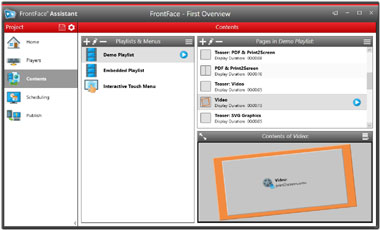
Convenient Content Management
Controlling display content is super-easy with FrontFace. The software comes with a special application called FrontFace Assistant which you can install on any Windows PC. It allows composing and controlling content and playlists for your display(s). You can use schedules for running time-controlled playlists or display ad hoc content! Working with the intuitive FrontFace Assistant is so easy that even untrained users can work with it hassle-free. Screens can be updated instantly while the software is running either using a local network connection (online) or a USB flash drive (offline update).
No Subscriptions!
Subscriptions that run for 5 years and longer for a waiting room TV solution and high costs for integrating individual content? Yes, that is quite common (sadly!) but not when using FrontFace! This software does not incur any recurring costs and you alone decide which content you want to show in your playlists. Additionally, you get a full year of free e-mail support in case you need any help. Mounting a flat screen on the wall and hooking up a standard PC to it is no real challenge and does not cost very much. But finding a good digital signage software product is the critical part — however you have just found the ideal solution: FrontFace!
New: Use your waiting room TV also as a call-up system!
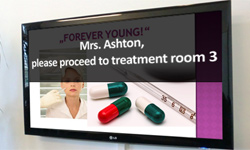 Our software can easily be extended by using so called "plugins." The "Remote Control Plugin" allows you to use your waiting room TV also as a flexible call-up system for patients. For this purpose, a small app is installed on the doctor's receptionist PC that can send text messages directly to the waiting room screen, e.g. "Mrs. Ashton, please proceed to treatment room 3!" These messages then appear on the screen and can also be highlighted using a custom sound, e.g. a bell. This feature lets your patients know when to proceed to the treatment rooms and helps capture even more attention to the screen. How this works is explained in our quick start tutorial!
 It's easy! Give it a try today! - Here is how to get started:
- Download the fully-functional, free trial version.
- Watch the quick start videos (installation and usage of the software).
- Take a look that the quick start tutorial "Call-Up System for Waiting Areas" if you want to use the screen in your waiting room to also call up patients!
- Learn more about the FrontFace software (pricing, license model) and also about "hardware".